Friday, October 17, 2008

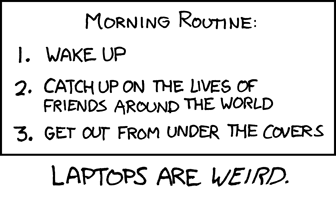
Morning Routine, XKCD Style


Which is why I use a Blackberry.

Thursday, October 2, 2008

Dell Insperion Mini 9 - Initial Thoughts

The Dell Inspiront Mini 9 Netbook is reviewed at PC Magazine. I've gotten my hands on a unit with 1 GByte system memory, 16 GByte solid state disk drive with Windows XP Home installed. The unit has been with me for about eight hours and I'm writing this post with it. The actual specifications are available from Dell, or from the PC Mag review, so here I will limit my comments to my impression of how it is to use.

The first impression is the size, as the PC Mag review says it has the same footprint as the ASUS EE PC but a much better screen. The keyboard is also small and has some odd shaped keys around the edges. A machine of this type is always going to be a compromise between ease of use and power vs size and weight. If you are looking for a light duty maching to surf, email blog or office tasks while on the road and you don'd have a lot of space or weight for a lap top the Mini 9 could be for you. Initially I thought I would never be able to touch type on the keyboard, I'm still making some mistakes but it isn't too bad, and I think after a few days I will be back up to my normal speed.

It is really a great package, I'm sitting on the couch, watching PVR with the Mini 9 on my lap and it isn't cooking my thighs. The screen is bright and very readable, there is no fan or disk noise and it isn't much heavier than some of the remote controlls I have for my entertainment system. When the lid is closed, or I just ignore it for too long, it takes some time to get prepared for standby. When I'm ready to go again it takes almost no time to come back up. This is one of the great things about having a solid state disk drive.

Battery life is quite good, the wall wart power charger is tiny compared to other laptops. It would have been very nice if Dell could have arranged to fold the power prongs into the unit like Sony has been doing for a long time. Recharging is very quick, so if you are travelling it may be worth while to pop in the charger for a five or ten minutes during a layover.

I ordered the unit with XP pre-loaded for two reasons: the shipping date was earlier, and I like to have my portable computers dual boot to Linux and Windows (preferably XP) for ultimate flexability. With the XP preload and Open Office installed I still have 10GBytes of disk space left for a Linux partition. I expect the low end versions with 512MBytes of system memory and 4GBytes of disk and Ubuntu pre-installed will be very good, and inexpensive tools for road warriers.

So far I really like it, and it is my favourite mobile computer at the moment.
Friday, August 8, 2008

Blackberry OS 4.5 - The First 12 Hours

So after about 12 hours of use here are my impressions.

User Interface:
The included applications (Mail, Calendar, Address Book, etc) all have a dressed up user interface. This doesn't add anything but eye candy, but its nice.

Browser:
The WiFi Browser is now called Hot Spot Browser. It now has a start page separate from the bookmark list that has a URL field; a search field that searches Google, Wikipedia or Dictionary.Com; Bookmark and History mini lists that link to full lists; and it does favicons. There also seems to be better JavaScript support. The best thing though is the cursor in column view. This is a cross between what were mobile and desktop views. Instead of scrolling through text and randomly (or so it seems) jumping between links, you can now have a cursor that you can drive exactly where you want. Wonderful.

Calendar:
Appointments can now be "Sent using" one of your configured mail sources. What, exactly that means in every case will need some investigation. Each "calendar" can be configured for wireless sync (if you have a Unite or BES server), and each gets its own colour.

So far I'm pleased, but don't use the Rogers version. Search the web to find the latest release.

Thursday, August 7, 2008

Blackberry 8820 OS 4.5 Rogers Upgrade

I found the official Rogers version of Blackberry OS 4.5 (4.5.0.37 Release 52, the "latest" release for this device is 4.5.0.75) so I've decided to install it today. Normally when upgrading the OS on a Blackberry you want the desktop software version to match that of the OS upgrade. Rogers doesn't have the Desktop Manager 4.5 so I installed the RIM generic version. This simply means that I had to track down and delete (actually I rename) the vendor.xml file. Vendor.xml determines which versions of what software the Desktop Manager will install on the device. If someone else is managing your Blackberry, you probably don't want to do this without their permission, but I manage my own.

Once vendor.xml was taken care of the Desktop Manager offered to upgrade my unit. You will probably, like me, want to go into the advanced options and change the load out somewhat; enable Blackberry Maps, disable languages you don't need, etc. Make sure a complete backup of your data is enabled and click next.

The process of the upgrade proceeded very smoothly but it does take time, and you don't want any interruptions, so make sure you have good reliable power supplied to your PC. The longest part of the installation is after the new software has been installed and the Blackberry reboots. I can take a very long time to come back. This is normal but can be worrying the first time you go through it. My device took nearly a half hour of flipping the hourglass to get everything sorted out. Once it came back the desktop automatically restored the data.

Most things came back just fine. I had to reload Facebook, the starter icon was on the ribbon, but the application was removed. You still can't past the password from the password keeper which is stupid.

So far I haven't noticed any real significant changes. The GPS has a location enable/disable option and location assist. It will take time to see if location assist does anything useful. There is a new theme, but I don't like it any better than the one I'm using now. There are some changes to the WiFi configuration screens that I will have to explore. BIS activation came back automatically, but I had to re-activate on Unite.

Update:

Should have gone with the latest release. 4.5.0.37 has a really stupid bug to find its way into a production release. Sigh!

Monday, July 21, 2008

Cessna 206 - Tiweano Equador

I came across this video of a jungle landing and just had to share it. Unfortunately the quality isn't really good. Is that a dog on the runway or a trick of the light?

Wednesday, July 2, 2008

So What's up with the COPA Website - its Back

It looks like the Canadian Owners' and Pilots' Association domain registration has expired.

Copa is back. If you go to their web site www.copanational.org you will see a Network Solutions page offering a back order or renewal of the domain. I hope they get this sorted soon. their normal informative pages.

Wednesday, June 11, 2008

Fabric Covered Car

We've had fabric covered airplanes for a long time. Shrinking the fabric as part of the finish process allows for quite complex forms without complex production methods. Now BMW is using this in a concept car called GINA. Fabulous! You have to watch.